I use FL Studio 11 to make my music. Some people find this surprising, due to FL Studio's stigma as being a "toy" DAW that it simply cannot seem to shake, despite the fact it actually does most things as well or better than other professional DAWs. FL Studio has two real, significant issues: Large projects are unstable, and it has extremely bad 64-bit support.
This is almost never what people actually complain about. Instead, people complain about FL studio lacking features when they really just need to enable the right option. My friend lamented FL Studio's poor handling of automation clips without knowing about the "browse parameters" feature that lists all of a synth's parameters and highlights the one you are changing. He then complained that it didn't play notes when you started playback in the middle of them - this can be toggled in the audio settings. He also didn't know how to group multiple instruments to be controlled by the same piano roll, so I had to show him how to use Layers. Every single reason he gave for FL Studio being crap was just him not understanding how to use it properly, or not knowing where to find a specific feature.
This is the exact same problem Microsoft had with Word, and it's what resulted in the Ribbon GUI overhaul. Every reason people gave for not liking Word was just a result of them not being able to find the feature they wanted in an endless cascade of menus. To address this, it required a GUI overhaul so those features were grouped in intuitive ways, so people could find them more easily.
Even APIs can suffer from the Microsoft Word Problem. OpenGL, especially it's early incarnations, was essentially a giant, opaque list of functions that randomly referenced each other and had no clear organization. The online documentation is literally just an alphabetized list of every single OpenGL function in existence. The end result is that you need to know precisely what you want to do in order to find the right function. This is in contrast to DirectX, which (for example) has every single renderstate in a single, enormous enumerator. That enumerator contains something like 50 or so equivalent OpenGL function calls, which are not grouped in any meaningful way. It's documentation, like everything else on MSDN, is organized in hierarchical groups. DirectX tells you every single possible thing you theoretically might be able to do with your graphics card. OpenGL, on the other hand, has extensions, which are both a blessing and a curse. It makes OpenGL inherently more adaptable than DirectX, but at the cost of having absolutely no idea what the graphics card may or may not be capable of, because it's just not in OpenGL, it's in some extension you have to dig up.
Just like Microsoft Word, the features are all there in OpenGL, they're just harder to get to. And you'd better hope you know exactly what your technique is called, or you'll never find the function you want. WebGL inherits this problem, and throws on a few of its own inherent with attempting to bolt a low-level C api on to a high level web language that needs to be sandboxed.
We can't simply implement a feature, we have to make it easy to find, and easy to use, or it's worthless. It's amazing how quickly programmers forget the importance of context. In all of these cases, the solution to feature overload is conceptually very similar - Word created the Ribbon, which grouped related features under tabs and sub-groups. A similar grouping of OpenGL functions and parameters would do wonders for it's usability. FL Studio would also benefit by dumping it's left-hand browsing bar in favor of a Ribbon or module approach that didn't force 15 wildly different GUI styles into a single menu.
Context is important. If I want to find the function that sets the alpha blending operation in OpenGL, I should not have to go through over 300 functions to find it. I should be able to go to the "sampling" functions and look in the "blending" subgroup, and poof, all the functions that have anything to do with blending are there. It doesn't matter if we're designing word processors, digital audio workstations, low level APIs, middleware, or web applications. Anything and everything is susceptible to the Microsoft Word Problem.
September 18, 2013

September 12, 2013
Write Less Code
"Everything should be as simple as possible, but not simpler." - Albert Einstein (paraphrased)The burgeoning complexity of software is perhaps one of the most persistent problems plaguing computer science. We have tried many, many ways of managing this complexity: inventing new languages, creating management systems, and enforcing coding styles. They have all proven to be nothing more than stopgaps. With the revelation that the NSA is utilizing the inherent complexity of software systems to sabotage our efforts at securing our systems, this problem has become even more urgent.
It's easy to solve a problem with a lot of code - it's hard to solve a problem with a little code. Since most businesses do not understand the advantage of having high quality software, the most popular method of managing complexity is not to reduce how much code is used, but to wrap it up in a self-contained library so we can ignore it, instead. The problem with this approach is that you haven't gotten rid of the code. It's still there, it's just easier to ignore.
Until it breaks, that is. After we have wrapped complex systems into easy-to-use APIs, we then build even more complex systems on top of them, creating networks of interconnected components, each one encapsulating it's own complex system. Instead of addressing this burgeoning complexity, we simply wrap it into another API and pave over it, much like one would pave over a landfill. When it finally breaks, we have to extract a core sample just to get an idea of what might be going wrong.
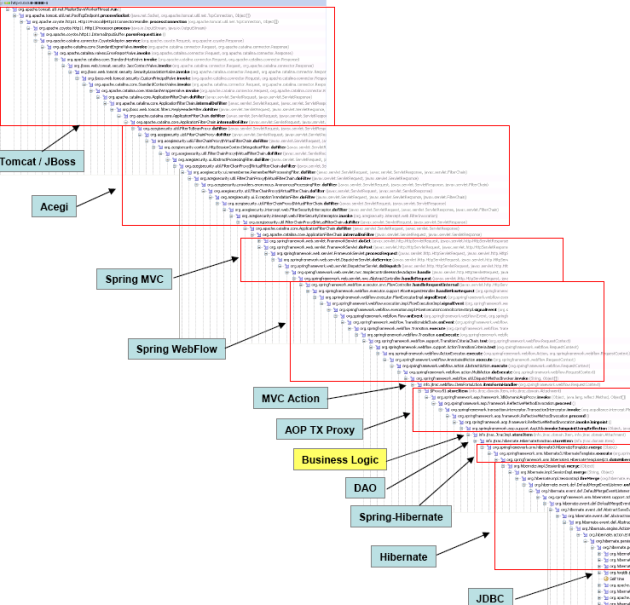
One of the greatest contributions functional programming has made is its concept of a pure function with no side-effects. When a function has side effects, it's another edge on the graph of components where something could go wrong. Unfortunately, this isn't enough. If you simply replace a large complex system with a bunch of large complex functions that technically have no side-effects, it's still a large complex system.
Object-oriented programming tries to manage complexity by compartmentalizing things and (in theory) limiting how they interact with each other. This is designed to address spaghetti code that has a bunch of inter-dependent functions that are impossible to effectively debug. The OO paradigm has the right idea: "an object should do exactly one thing, and do it well", but suffers from over-application. OO programming was designed to manage very large complex objects, not concepts that don't need Get/Set functions for every class member. Writing these functions just in case you need them in the future is a case of future-proofing, which should almost always be avoided. If there's an elegant, simple way to express a solution that only works given the constraints you currently have, USE IT. We don't need any more leaning towers of inheritance.

The number of bugs in a software program is proportional to how much code you write, and that doesn't include cheap tricks like the ternary operator or importing a bunch of huge libraries. The logic is still there, the complexity is still there, and it will still break in mysterious ways. In order to reduce the complexity in our software, it has to do less stuff. The less code you write, the harder it is for the NSA to sabotage your program without anyone noticing. The less code you write, the fewer points of failure your program will have. The less code you write, the less stuff will break. We cannot hide from complexity any longer; we must actively reduce it. We have to begin excavating the landfill instead of paving over it.
September 2, 2013
Most People Have Shitty Computers
Premature optimization is the root of all evil - Donald KnuthEver since I started putting words on the internet, I have complained about the misinterpretation and overgeneralization of this Donald Knuth quote. Developers essentially use it as an excuse to never optimize anything, because they can always say they "aren't done yet" and then permanently render all optimizations as premature. The fact that "premature" is inherently a subjective term doesn't help. The quote was meant to target very low-level optimizations that are largely useless until you're positive everything else is working properly and you have no other low-hanging fruit to optimize.
Instead of following that advice, and only doing complex optimizations after all the low-hanging fruit has been picked, developers tend to just stop optimizing after the low-hanging fruit is gone. Modern developers will sometimes stop optimizing things entirely and leave it up to the compiler, which almost always does a horrible job at it. Because web development is inherently dependent on one of the worst programming languages currently being used by anyone, these issues are even more prominent.
When people complain about stuff not working on their phones while on shitty internet connections (which is every single free wifi hotspot ever), the developers tell them to stop using shitty internet connections. When they complain about how slow and unresponsive a stupid, unnecessary app whose entire purpose is to just display text (I'm looking at you, Blogger), the developers tell them to get a better phone. When someone writes an app that doesn't compress anything and sucks up bandwidth like a pig, for absolutely no reason at all, the developers tell them to get a better data plan.
What the fuck?
Just because you have a desktop with an 8-core processor and 32 gigs of RAM doesn't mean your customers do. The number of people using the top-of-the-line technology is a tiny fraction of the total number of people who actually use the internet, which at this point is more than 1/3 the population of the entire human race. Only targeting hipster white kids who live in San Francisco and have rich parents may work for a small startup, but when Google's mail app turns into a piece of sludge that moves about as fast as pitch at room temperature, we have crossed a line. Google is everywhere. Their stuff should work well on the shittiest internet connection you can imagine. You can't go around expecting all your customers to have perfect internet all the time when it's just not possible.
Don't just target the latest version of Windows and tell the other versions to stuff it, because it's almost never really necessary when all you're doing is using 3 or 4 new functions introduced in Windows 7 that could easily be encapsulated in a small check. Don't write your game in such a way that it will only be playable on a high end gaming machine because you will get a lot of flak. If making this happen is hard, you probably have a shitty game engine that has a bad architecture. Likewise, when my orchestral VSTi sucks up 10% of my CPU while it's just sitting there and NOT ACTUALLY DOING ANYTHING, something is seriously wrong. I know it's using the exact same sample format as Kontact (someone reverse-engineered it), except that it does everything 4 times slower. Yet, when people complain, and they complain all the time, the response is always "you need a better computer."
Most people have shitty computers. Your customers don't care about all the cool new features you can implement for your mail app now that you have time to work on them because you never bothered to optimize it properly - they just want a mail app that WORKS.
July 23, 2013
Leap Motion Impressions, Input Sanitation, and 3D Gesture Ideas
Pros:
Cons:
- For the most part, does what it claims it does, and gives you extremely precise, fast tracking of fingers.
- Really hates thumbs for some reason.
- Has a lot of trouble with pens or other implements.
- Fingers must be separated.
- Fairly easy to get positions that break the camera because it can't see the fingers.
- No one has any idea how to write software for it.
I just got my Leap Motion device today, and for the most part, I like it. It does most of the things I expected it to do. It seems like something that could become very useful down the line. Unfortunately, right now, I wouldn't recommend getting one if you wanted something that's more than a toy.
This isn't entirely the fault of the device itself, but more a combination of driver limitations and boneheaded software that doesn't know what it's doing. The device is so new, no one knows how to properly utilize it, so almost all the apps that exist right now are either garbage or ridiculously sensitive to your setup. There are, however, a few more serious problems that should be addressed by the Leap Motion team.
First of all, the driver hates thumbs. It seems like it's trying to edit them out when they aren't positioned like a finger, which makes any sort of pinching gesture impossible to do. In addition, it doesn't like it when you try to use a pen, despite the fact that it's specifically designed to let you do so. Both of these problems seem more like driver analysis problems, so I expect they'll be corrected soon. I know these aren't hardware limitations, because the camera can see the stupid pen, the driver just has to recognize it as a tool and disregard the hand holding it, which is really doesn't want to do - It's obsessed with hands. I should call it the Lyra driver from now on.
A more fundamental and concerning issue is the ease in which I can assume a position that blocks the camera's view of some or most of my fingers. Pretty much anything that involves my fingers being vertically aligned breaks the driver, along with everything from a roughly 90 degree to 135 degree angle, pointed away from the device. This appears to be an inherent issue with the device itself, and its the same problem the kinect would have, because the camera's view of the fingers gets blocked. How much more effective would a leap motion device with two cameras, one on either side of the monitor, be? Or just a wider camera angle (since it's using dual emitters anyway to get depth information). As it is right now, it's cute and futuristic looking, but any minority-report-esque gestures completely break it.
A much more unexpected issue is the fact that the device makes no attempt to deal with fingers that are held together, despite the fact that the shape of two touching fingers is fairly easy to figure out. If you've been tracking one finger and suddenly it meets up with another one and you end up with one really wide "finger", it should be trivial to send this information as a "double finger" pointing, because this is an incredibly useful gesture (see below for details). It's not like the finger is going to change into a hippopotamus all of a sudden.
3D Gestures
Most of the other problems are software oriented, not hardware or driver related. The simple fact is that no one has any idea how to properly utilize the device. Most apps seem to assume there's only going to be one finger pointed at the screen, and will get confused if you have any other fingers hanging off even if they're not pointed at the screen. The Leap Motion driver gives you a rough estimate of what it thinks the hand orientation is, and using this information its fairly trivial to figure out which finger someone is pointing with, even if their other fingers are only slightly below that finger. The camera is on a flat surface at a 90 degree angle from the screen, which means the finger you want is almost always going to be the finger that is the "highest" in relation to the hand orientation.
The rest of the apps either don't do much processing on the raw data, or do an incredibly bad job of it. The touch screen recreation had this horrible tendency to start sliding off, and the cursor would sometimes jump around. I knew it shouldn't be doing that because I've been watching the diagnostic information and it's just getting confused by ghost fingers popping in and out. Guess what? A finger can't teleport. If you've been tracking one finger, chances are you should keep tracking it no matter what else happens.
In addition, no one's really come up with effective 3D gestures. All the apps try to use the 3D plane by turning it into a virtual touchscreen and it doesn't work very well. Instead, we should be using gestures that are independent of a 2D plane. The apps need to be paying attention to the angle the finger is pointing in instead of trying to rely on moving your entire hand around. It seems like everyone is using the position information instead of the angle information, which the driver provides. If I'm pointing up and to the right, my cursor should be in the corner of the screen no matter where my hand is.
Furthermore, no one seems to be trying very hard to deal with noise. When the driver starts losing precision, you can tell because the angle information or position information will start to jitter. The more jittering, the less accurate the reading is. A simple way to quantify this is by calculating the variance of the recent data. The higher the variance, the less accurate your reading is. You should then scale how heavily you average out the points based on how much variance there is in the data. This allows you to avoid destroying precision while preventing the cursor from exploding when you lose accuracy. There's a lot of algorithms dedicated to solving this exact problem, so it's kind of ridiculous that no one is using them. In a more specific scenario, humans do precise manipulations with their fingers, not their hands. Small pertubations in the input data that occur in the hands should be removed from the finger positions, because it's just the hand trembling, not the actual finger.
Instead of trying to recreate "pushing a button" in 3D, we should use a gesture interface that lets you move the cursor around with your index finger, and then when you bring up your middle finger against your index finger (so you are now pointing at the screen with two fingers), this counts as a "click" or a mouse-down. You can then drag things around with two fingers, or separate them to generate a mouse-up event. To right-click, bring your two fingers together again, and then rotate your hand clockwise. This could be combined with a more traditional "pushing a button" gesture for easier clicks, but provides a much more robust way of moving things around that isn't awkward or difficult to use.
Since the driver currently doesn't let you track two fingers held together, this same behavior can be emulated by simply keeping track of two fingers and detecting when both of them accelerate towards each other until one of them vanishes. On this same note, because fingers can drop out of tracking, programs can't rely on the driver to be perfect. If you lose track of a finger, it's not that hard to guess where it might be based on the orientation of the hand, which is necessary if we're going to have good gesture recognition. The recognizer needs to be able to interpolate likely positions of lost fingers if it's going to make an effective guess about what gesture was intended.
Leap Motion is really cool. Leap Motion is definitely the future. Unfortunately, we haven't gotten to the future yet. We need a better software framework to build gesture interfaces on top of, and we need a new standard set of gestures for 3D that aren't simply 2D ripoffs. Incidentally, I'd love to try building an open-source library that addresses a lot of the input sanitation problems I outlined in this article, but I'm a bit busy with the whole "finding a job so I don't starve to death" thing. Hopefully, someone else will take up the cause, but until they do, don't expect to be very productive with the Leap Motion.
July 11, 2013
Aurora Theory Released!
Aurora Theory has been released! Buy it on bandcamp for $9, or $10 on iTunes, Amazon, and Google Play. The album is also available on Spotify, last.fm, other online radios, and can be previewed on YouTube.
Aurora Theory has been 4 years in the making, a compilation of all the songs I managed to make in the middle of attending university. The earlier songs have been extensively improved, and all songs have been remastered for the album's release. This album represents nothing less than the highest quality work I can possibly manage at this point in my career. I've acquired a fair number of fans over the years, and I want to thank you for supporting my musical endeavors so far.
Track List:
1. Soar (Original Mix) [5:49]
2. Aurora Theory (Redux) [4:10]
3. Cosminox [5:41]
4. Tendril [5:32]
5. Birefringence [3:57]
6. Critical Damage (Extended Mix) [3:45]
7. Starstruck [4:22]
8. Dream Among The Stars [4:06]
9. At The Nationals [4:02]
10. The Cloud River [5:38]
11. The Piano And The Cello [3:53]
12. Snowflower [5:53]
13. Spiral Nebula [5:44]
14. Next Year [5:31]
Aurora Theory has been 4 years in the making, a compilation of all the songs I managed to make in the middle of attending university. The earlier songs have been extensively improved, and all songs have been remastered for the album's release. This album represents nothing less than the highest quality work I can possibly manage at this point in my career. I've acquired a fair number of fans over the years, and I want to thank you for supporting my musical endeavors so far.
Track List:
1. Soar (Original Mix) [5:49]
2. Aurora Theory (Redux) [4:10]
3. Cosminox [5:41]
4. Tendril [5:32]
5. Birefringence [3:57]
6. Critical Damage (Extended Mix) [3:45]
7. Starstruck [4:22]
8. Dream Among The Stars [4:06]
9. At The Nationals [4:02]
10. The Cloud River [5:38]
11. The Piano And The Cello [3:53]
12. Snowflower [5:53]
13. Spiral Nebula [5:44]
14. Next Year [5:31]
Subscribe to:
Posts (Atom)